Complete Python Masterclass | Zero To Hero
Complete Python Masterclass | Zero To Hero
Python learn daily my practice
https://learning.ccbp.in/
https://www.geeksforgeeks.org/getting-started-with-python-programming/?ref=lbp
for video link
https://www.youtube.com/watch?v=OLPbd-7Pp_8&list=PLqM7alHXFySHLJWu_Euw7pdI4ec1hHTLI
online paint app
https://kleki.com/
https://www.udemy.com/course/comprehensive-python-programming-bootcamp-masterclass/learn/lecture/26321672#overview
30/09/2024
-----------------------------------------------------------------------------------------------------------------------------
install
1) Anaconda
2) Jupyter Note book
In begining Start server for Jupyter Note book
how to open anaconda navigator in mac terminal jupyter notebook server on how to do open
method -1:
Go to Your Apps menu select and open "Anaconda " app
now terminal open automatically server on .
auto matically a new web page open local host server begining now
method -2:
step 1-> press short cut
-> command + space bar press
search in "terminal ", Hit Enter Button.
To activate and use the Conda environment located at /Users/mac/Documents/vs code projects/myenv and start a Jupyter Notebook server, follow these steps:
1. Activate Your Conda Environment
Open Terminal:
- Press
Command + Space, typeTerminal, and pressEnter.
- Press
Activate the Environment:
- Use the following command to activate the environment located in your specific path:
step 1-> press short cut
-> command + space bar press
search in terminal text
open terminal
copy paste the below path in the terminal
--------------------------------------------------------------------------------------------
"
conda activate /Users/mac/Documents/vs\ code\ projects/myenv
"
--------------------------------------------------------------------------------------------
Hit Enter button
step 2-> copy paste the below path in the terminal
--------------------------------------------------------------------------------------------
"jupyter notebook"
2. Start Jupyter Notebook Server
Once the environment is activated, you can start the Jupyter Notebook server:
- Run Jupyter Notebook:
- After activating the environment, start the Jupyter Notebook server by typing:
--------------------------------------------------------------------------------------------
"jupyter notebook"
Shut down this Jupyter server (y/[n])?
select "y" -> hit "Enter"
Shutdown confirmed
Shutting down 10 extensions

.png)
"anaconda-navigator"
paste this text in terminal
- This will open the graphical interface for Anaconda Navigator.
2. Launch Jupyter Notebook Server from the Terminal
Activate the Anaconda environment (optional):
- If you want to use a specific environment, first activate it. Replace
myenvwith your environment name: - conda activate myenv "
- paste this text in terminal
|
Start Jupyter Notebook:
"jupyter notebook"
3. Access Jupyter Notebooks
|
 |
| 1 |
 |
| 2 |

 |
3  |
variables

variables
Table of Content
- Writing your first Python Program
- Comments in Python
- Keywords in Python
- Python Variable
- Python Data Types
- Python Input/Output
- Python Operators
- Python If Else
- Python For Loop
- Python While Loop
- Python Functions
- What’s Next
print("Hello World! I Don't Give a Bug")
# sample comment
# This is Python Comment
name = "geeksforgeeks"
print(name)
#print function
print("Hello World")
o/p:Hello World
పైథాన్లోని కీవర్డ్లు రిజర్వ్ చేయబడిన పదాలు, వీటిని వేరియబుల్ పేరు, ఫంక్షన్ పేరు లేదా ఏదైనా ఇతర ఐడెంటిఫైయర్గా ఉపయోగించలేరు.

Python Variable
- A Python variable name must start with a letter or the underscore character.
- A Python variable name cannot start with a number.
- A Python variable name can only contain alpha-numeric characters and underscores (A-z, 0-9, and _ ).
- Variable in Python names are case-sensitive (name, Name, and NAME are three different variables).
- The reserved words(keywords) in Python cannot be used to name the variable in Python.
print(y)
Rules of Variable
variable is case-sensitive
    11 sagar=12
       ^
SyntaxError: invalid syntax
11sagar = 13
print(11sagar)
o/p:
 Cell In[19], line 1
    11sagar = 13
     ^
SyntaxError: invalid decimal literal
    16 = "SAGAR"
    ^
SyntaxError: cannot assign to literal here. Maybe you meant '==' instead of '='?
Variables need not be declared first in python. They can be used directly. Variables in python are case-sensitive as most of the other programming languages.
---------------------------------------------------------------------------
NameError                                 Traceback (most recent call last)
Cell In[17], line 1
----> 1 __init__

NameError: name '__init__' is not defined
---------------------------------------------------------------------------Cell In[43], line 1 vidya sagar = 20 ^ SyntaxError: invalid syntax
---------------------------------------------------------------------------vidyasagar = 21
vidya_sagar = 22
#minus is a assignmet operatos so it is not valid it is invalid for inbetween the variable.vidya-sagar = 23 Cell In[49], line 1 vidya-sagar = 23 ^ SyntaxError: cannot assign to expression here. Maybe you meant '==' instead of '='?-------------------------------------------------5vidyasagar = 24 #variable front number not valid showing errorvidyasagar5 = 25vidya6sagar = 26vidya_7_sagar = 27
-------------------------------------------------7 vidya_sagar = 28 #space not validCell In[59], line 1 7 vidya_sagar = 28 ^ SyntaxError: invalid syntax-------------------------------------------------vidyasagar 8 = 29Cell In[5], line 1 vidyasagar 8 = 29 ^ SyntaxError: invalid syntax-------------------------------------------------VidyasagaR 9 = 30
-------------------------------------------------VIDYASAGAR 11 = 31Cell In[9], line 1 VIDYASAGAR 11 = 31 ^ SyntaxError: invalid syntax-------------------------------------------------
--------------------------------------------------------------------------------------------------
------------------------------------------------------------------------------------------------

Data Types
Python supports various data types, including integers, floats, strings, lists, tuples, dictionaries, and more.
#PYTHON DATA TYPES
# Numeric
# Sequence Type
# Boolean
# Set
# Dictionary
# Numeric
# Integers
# Float
# Complex Numbers
# Sequence Type
# String
# List
# Tuple
# Boolean
# True
# False
# T or F
# Set
# set() #function
# In Python, Set is an "unordered collection of data types" that is iterable, mutable, and has no duplicate elements.
# The order of elements in a set is undefined though it may consist of various elements.
# Creating Sets
# Sets can be created by using the built-in set() function with an iterable object or a sequence by placing the sequence inside curly braces, separated by a ‘comma’.
# The type of elements in a set need not be the same, various mixed-up data type values can also be passed to the set.
# Dictionary
# Dictionary in Python is an "unordered collection of data values",
# used to store data values like a map, which unlike other Data Types that hold only single value as an element,
# Dictionary holds key:value pair. Key-value is provided in the dictionary
# to make it more optimized. Each key-value pair in a Dictionary is separated by a colon :, whereas each key is separated by a ‘comma’.
# Creating Dictionary
# In Python, a Dictionary can be created by placing a sequence of elements within curly {} braces, separated by ‘comma’.
# Values in a dictionary can be of any datatype and can be duplicated, whereas keys can’t be repeated and must be immutable.
# Dictionary can also be created by the built-in function dict().
# An empty dictionary can be created by just placing it to curly braces{}.
# Note - Dictionary keys are case sensitive, same name but different cases of Key will be treated distinctly.
- Integers: Whole numbers without decimals.
- Floats: Numbers with decimals.
- Strings: Text enclosed in single or double quotes.
- Lists: Ordered collections of items.
- Tuples: Immutable collections of items.
- Dictionaries: Key-value pairs.
What is Python Data Types?
To define the values of various data types of Python and check their data types we use the type() function . Consider the following examples.
This code assigns variable ‘x’ different values of various Python data types. It covers
string ,
integer ,
float ,
complex ,
list ,
tuple ,
range ,
dictionary ,
set ,
frozenset ,
boolean ,
bytes ,
bytearray ,
memoryview ,
and the special value ‘None’ successively.
Each assignment replaces the previous value, making ‘x’ take on the data type and value of the most recent assignment.
x = "Hello World"
x = 50
x = 60.5
x = 3j
x = ["geeks", "for", "geeks"]
x = ("geeks", "for", "geeks")
x = range(10)
x = {"name": "Suraj", "age": 24}
x = {"geeks", "for", "geeks"}
x = frozenset({"geeks", "for", "geeks"})
x = True
x = b"Geeks"
x = bytearray(4)
x = memoryview(bytes(6))
x = None
1. Numeric Data Types in Python
2. Sequence Data Types in Python
Accessing elements of String
List Data Type
Tuple Data Type
Access Tuple Items
3. Boolean Data Type in Python
4. Set Data Type in Python
Create a Set in Python
Access Set Items
5. Dictionary Data Type in Python
Create a Dictionary in Python
Accessing Key-value in Dictionary
Python Data Type Exercise Questions
Indentation
Python uses indentation to define blocks of code, such as loops and functions. Use four spaces for indentation. Incorrect indentation can lead to syntax errors.
if x > 10:
    print("x is greater than 10")
else:
    print("x is less than or equal to 10")
----------------------------------------------------------------------------------------------
----------------------------------------------------------------------------------------------
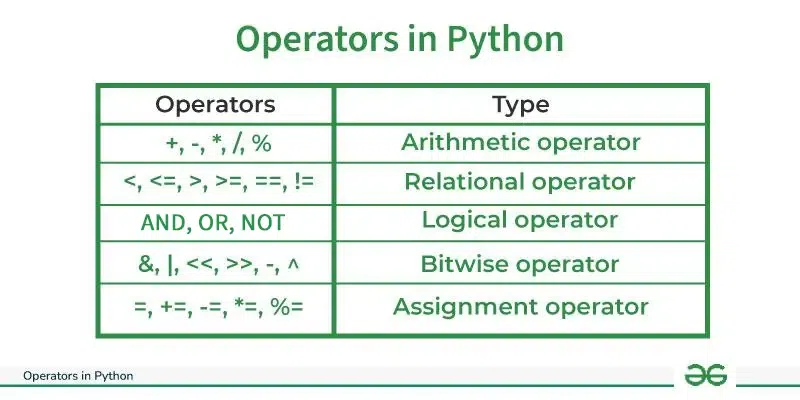
Python Operators
In Python programming, Operators in general are used to perform operations on values and variables. These are standard symbols used for logical and arithmetic operations. In this article, we will look into different types of Python operators.
OPERATORS: These are the special symbols. Eg- + , * , /, etc.
OPERAND: It is the value on which the operator is applied.
Operators
Python supports various operators, including arithmetic, comparison, logical, and assignment operators.
11/10/24
- 1) Arithmetic operators:
+,-,*,/,%,**(exponentiation),//(floor division). - 5) Comparison operators:
==,!=,<,>,<=,>=. - 4) Logical operators:
and,or,not. - 2) Assignment operators:
=,+=,-=,*=,/=,%=,**=,//=. - 3) Bitwise operators:
&,|,^,~,<<,>>. - Strings: Strings can be enclosed in single or double quotes. You can use the
+operator to concatenate strings.
greeting = "Hello"
name = "John"
message = greeting + ", " + name + "!"
print(message)  # Output: Hello, John!
Control Flow
Python supports various control flow structures, such as if-else statements, loops, and more.
- If-else statement
if x > 10:
    print("x is greater than 10")
else:
print("x is less than or equal to 10") - For Loops
for var in iterable: # statements - While Loop
while expression:
    statement(s)
Functions
Functions are blocks of code that perform a specific task. You can define your own functions using the def keyword.
def greet(name):
    print(f"Hello, {name}!")
greet("GeeksforGeeks")  # Output: Hello, GeeksforGeeks!
1) Arithmetic operators
----------------------------------------------------------------------------------------------
----------------------------------------------------------------------------------------------
1) Python Arthmetic Operators

PRECEDENCE:
- P - Parentheses
- E - Exponentiation
- M - Multiplication (Multiplication and division have the same precedence)
- D - Division
- A - Addition (Addition and subtraction have the same precedence)
- S - Subtraction
The modulus operator helps us extract the last digit/s of a number. For example:
- x % 10 -> yields the last digit
- x % 100 -> yield last two digits
1. Addition (+)
Adds two numbers.
a = 10b = 5result = a + b # result is 15
Ex:1
#additiona = 1b = 2c = a+b print(c)o/p = 3
Adds two numbers.
2. Subtraction (-)
Subtracts the second number from the first.
a = 10
b = 5
result = a - b # result is 5
Ex:1
#Subtraction (-)
a = 500
b = 250
c = a-b
print(c)
Subtracts the second number from the first.
a = 10
b = 5
result = a - b # result is 5
Ex:1
#Subtraction (-)
a = 500
b = 250
c = a-b
print(c)
o/p = 250
3. Multiplication (*)
The asterisk (*) symbol in Python serves multiple purposes depending on the context in which it is used. Here’s an overview of its different uses.
3. Multiplication (*)
The asterisk (*) symbol in Python serves multiple purposes depending on the context in which it is used. Here’s an overview of its different uses.
Multiplies two numbers.
python
a = 10
b = 5
result = a * b # result is 50
EX:1
#Multiplication (*)
a = 10
b = 10
c = a*b
print(c)
o/p = 200
4. Division (/)
Divides the first number by the second and returns a float (even if both operands are integers).
it is single division operator its give floating value as an output
The parts of a division operator
dividend, divisor, quotient, and remainder:

a = 11b = 2
c = a / b
c = 5.5 it is a floating value

పాయింట్ తర్వాత వచ్చే వాల్యూ అనేది ఫ్లోటింగ్ అవుతుంది లేదా మారుతుంది
Topic video link : https://www.youtube.com/watch?v=od-tR72Y9lk
ex: 1
a = 10
b = 5
result = a / b # result is 2.0
ex:
a = 10
b = 3
result = a / b # result is 3.3333333333333335
o/p: 3.3333333333333335 ----> it is floating value

12/7 =1.7
EX :1
#Division (/)a = 100b = 2c = a/b print(c)
o/p = 50.0
3/1 = 3.0 3//1 = 1
5. Floor Division (//)
Performs integer division and returns the largest possible integer (rounds down).
python
a = 10
b = 3
result = a // b # result is 3
Ex:1
12//7 = 1
7//3 = 2
Ex:2
#Floor Division (//)
a = 300
b = 2
c = a//b
print(c)
o/p = 150
Example for usage of #Floor Division (//) and # Division(float)
purpose For Loop:
#EX:1
a = 10
b = 3
for i in range(1,10):
print(i)
o/p:
1
2
3
4
5
6
7
8
9
#EX:2
a = 10
b = 3
print(a/b)
o/p: 3.3333333333333335
#Ex:3
a = 10
b = 3
for i in range(1,a/b): # లూప్ అనేది 1 నుండి 3.33333 వరకు రిపీట్ అవ్వాలి అన్నాను
print(i)
o/p:
లూప్ రిపీట్ అవ్వలేదు టైపు ఎర్రర్ వచ్చింది
3.33333 టైమ్స్ లూప్ రిపీట్ అవ్వదు -- ఫ్లోట్ వేల్యూ
3 టైమ్స్ మాత్రమే అవుతుంది --- ఇంటిజెర్ వేల్యూ
'ఫ్లోట్' ఆబ్జెక్ట్ను పూర్ణాంకంగా అర్థం చేసుకోలేము
#EX:4
a = 10
b = 3
print(a//b)
o/p: 3 ----> integer (పూర్ణాంకంగా) a//b = 3
#EX:5 #double division operator (a//b)
a = 10
b = 3
for i in range(1,a//b): # 1 2
print(i)
o/p:
1
2
----------------------------------------------------
12 / 5 = 2.4
12 // 5 = 2
-------------------------------------------------------------------------------
సింగిల్ డివిజన్ ఆపరేటర్ అనేది ఫ్లోట్ వేల్యూ కోసం ఉపయోగిస్తారు .
డబుల్ డివిజన్ ఆపరేటర్ అనేది కంప్లీట్ ఇంటిజెర్ వేల్యూ కోసం ఉపయోగిస్తారు .
-------------------------------------------------------------------------------
6. Modulus (%)

Returns the remainder when the first number is divided by the second.
modulus anedi
మొదటి సంఖ్యను రెండవ సంఖ్యతో భాగించినప్పుడు మిగిలిన మొత్తాన్ని (remainder value)అందిస్తుంది.
a = 10
b = 3
result = a % b # result is 1
a = 12
b = 5
a % b = 2
7. Exponentiation (**) or power
Raises the first number to the power of the second number.
in Python, exponentiation is represented by the ** operator.
For example, 2 ** 3 equals 8, which means 2 raised to the power of 3. You can also use the built-in pow() function for exponentiation, like pow(2, 3), which achieves the same result.
Ex:1
a = 2
b = 3
result = a ** b
# result is 8 (2^3)

Explanation:
2 * 2 * 2 = 8 #c = 4 ** 3 = 8
7 * 7 = 49 #c = 7 ** 2 = 49
4 * 4 * 4 * 4 * 4 = 1024 # c = 4 ** 5
10 * 10 * 10 = 1000 # c = 10 ** 3 = 1000
Ex:2
a = 2
b = 3
result = pow(a, b) #pow(2,3)
# result is 8 (2^3)
7 ** 2 = 49
3 ** 2 = 9
10 ** 3 = 1000
-------------------------------------------------------------------------------
Python Arithmetic operators
a = 10
b = 3
add = a + b # 13
subtract = a - b # 7
multiply = a * b # 30
divide = a / b # 3.3333...
floor_divide = a // b # 3
modulus = a % b # 1
exponent = a ** b # 1000 (10^3)
-------------------------------------------------------------------------------
Multiplies two numbers.
python
a = 10
b = 5
result = a * b # result is 50
EX:1
#Multiplication (*)
a = 10
b = 10
c = a*b
print(c)
o/p = 200
4. Division (/)
Divides the first number by the second and returns a float (even if both operands are integers).
it is single division operator its give floating value as an output
The parts of a division operator
dividend, divisor, quotient, and remainder:
a = 11
b = 2
c = a / b
c = 5.5 it is a floating value
పాయింట్ తర్వాత వచ్చే వాల్యూ అనేది ఫ్లోటింగ్ అవుతుంది లేదా మారుతుంది
Topic video link : https://www.youtube.com/watch?v=od-tR72Y9lk
ex: 1
a = 10
b = 5
result = a / b # result is 2.0
ex:
a = 10
b = 3
result = a / b # result is 3.3333333333333335
o/p: 3.3333333333333335 ----> it is floating value
5. Floor Division (//)
Performs integer division and returns the largest possible integer (rounds down).
python
a = 10
b = 3
result = a // b # result is 3
Ex:1
12//7 = 1
7//3 = 2
Ex:2
#Floor Division (//)
a = 300
b = 2
c = a//b
print(c)
o/p = 150
Example for usage of #Floor Division (//) and # Division(float)
purpose For Loop:
#EX:1
a = 10
b = 3
for i in range(1,10):
print(i)
o/p:
1
2
3
4
5
6
7
8
9
#EX:2
a = 10
b = 3
print(a/b)
o/p: 3.3333333333333335
#Ex:3
a = 10
b = 3
for i in range(1,a/b): # లూప్ అనేది 1 నుండి 3.33333 వరకు రిపీట్ అవ్వాలి అన్నాను
print(i)
o/p:
లూప్ రిపీట్ అవ్వలేదు టైపు ఎర్రర్ వచ్చింది
3.33333 టైమ్స్ లూప్ రిపీట్ అవ్వదు -- ఫ్లోట్ వేల్యూ
3 టైమ్స్ మాత్రమే అవుతుంది --- ఇంటిజెర్ వేల్యూ
'ఫ్లోట్' ఆబ్జెక్ట్ను పూర్ణాంకంగా అర్థం చేసుకోలేము#EX:4
a = 10
b = 3
print(a//b)
o/p: 3 ----> integer (పూర్ణాంకంగా) a//b = 3
#EX:5 #double division operator (a//b)
a = 10
b = 3
for i in range(1,a//b): # 1 2
print(i)
o/p:
1
2
----------------------------------------------------
12 / 5 = 2.4
12 // 5 = 2
-------------------------------------------------------------------------------
సింగిల్ డివిజన్ ఆపరేటర్ అనేది ఫ్లోట్ వేల్యూ కోసం ఉపయోగిస్తారు .
డబుల్ డివిజన్ ఆపరేటర్ అనేది కంప్లీట్ ఇంటిజెర్ వేల్యూ కోసం ఉపయోగిస్తారు .
-------------------------------------------------------------------------------
6. Modulus (%)
Returns the remainder when the first number is divided by the second.
modulus anedi
మొదటి సంఖ్యను రెండవ సంఖ్యతో భాగించినప్పుడు మిగిలిన మొత్తాన్ని (remainder value)అందిస్తుంది.
a = 10
b = 3
result = a % b # result is 1
a = 12
b = 5
a % b = 2
7. Exponentiation (**) or power
Raises the first number to the power of the second number.
in Python, exponentiation is represented by the ** operator.
For example, 2 ** 3 equals 8, which means 2 raised to the power of 3. You can also use the built-in pow() function for exponentiation, like pow(2, 3), which achieves the same result.
Ex:1
a = 2
b = 3
result = a ** b
# result is 8 (2^3)
Explanation:
2 * 2 * 2 = 8 #c = 4 ** 3 = 8
7 * 7 = 49 #c = 7 ** 2 = 49
4 * 4 * 4 * 4 * 4 = 1024 # c = 4 ** 5
10 * 10 * 10 = 1000 # c = 10 ** 3 = 1000
Ex:2
a = 2
b = 3
result = pow(a, b) #pow(2,3)
# result is 8 (2^3)
7 ** 2 = 49
3 ** 2 = 9
10 ** 3 = 1000
-------------------------------------------------------------------------------
Python Arithmetic operators
a = 10
b = 3
add = a + b # 13
subtract = a - b # 7
multiply = a * b # 30
divide = a / b # 3.3333...
floor_divide = a // b # 3
modulus = a % b # 1
exponent = a ** b # 1000 (10^3)
-------------------------------------------------------------------------------
1. Basic Assignment Operator (=)
This assigns the value on the right to the variable on the left.
2. Add and Assign (+=)
This adds the right operand to the left operand and assigns the result to the left operand.
3. Subtract and Assign (-=)
This subtracts the right operand from the left operand and assigns the result to the left operand.
4. Multiply and Assign (*=)
This multiplies the left operand by the right operand and assigns the result to the left operand.
5. Divide and Assign (/=)
This divides the left operand by the right operand and assigns the result to the left operand. The result is a floating-point number.

6. Modulus and Assign (%=)
This finds the remainder of division between the left and right operands and assigns the result to the left operand.
x = 10
x %= 3
# x is now 1


7. Floor Division and Assign (//=)
This performs floor division (integer division) between the left and right operands and assigns the result to the left operand.
x = 15
x //= 4
# x is now 3 (because 15 // 4 is 3)

8. Exponentiation and Assign (**=)
This raises the left operand to the power of the right operand and assigns the result to the left operand.
x = 2
x **= 3
# x is now 8 (because 2^3 is 8)
9. Bitwise AND and Assign (&=)
This performs a bitwise AND operation between the left and right operands and assigns the result to the left operand.
10. Bitwise OR and Assign (|=)
This performs a bitwise OR operation between the left and right operands and assigns the result to the left operand.
11. Bitwise XOR and Assign (^=)
This performs a bitwise XOR operation between the left and right operands and assigns the result to the left operand.
12. Bitwise Left Shift and Assign (<<=)
This shifts the bits of the left operand to the left by the number of positions specified by the right operand and assigns the result to the left operand.
x = 5 # (101 in binary)
x <<= 1
# x is now 10 (because 101 becomes 1010, which is 10)
13. Bitwise Right Shift and Assign (>>=)
This shifts the bits of the left operand to the right by the number of positions specified by the right operand and assigns the result to the left operand.
Example of Multiple Assignment Operators:
You can chain assignment operators for concise code:
| Decimal | 16 | 8 | 4 | 2 | 1 | Binary |
|---|---|---|---|---|---|---|
| 0 | 0 | 0 | 0 | 0 | 0 | 00000 |
| 1 | 0 | 0 | 0 | 0 | 1 | 00001 |
| 2 | 0 | 0 | 0 | 1 | 0 | 00010 |
| 3 | 0 | 0 | 0 | 1 | 1 | 00011 |
| 4 | 0 | 0 | 1 | 0 | 0 | 00100 |
| 5 | 0 | 0 | 1 | 0 | 1 | 00101 |
| 6 | 0 | 0 | 1 | 1 | 0 | 00110 |
| 7 | 0 | 0 | 1 | 1 | 1 | 00111 |
| 8 | 0 | 1 | 0 | 0 | 0 | 01000 |
| 9 | 0 | 1 | 0 | 0 | 1 | 01001 |
| 10 | 0 | 1 | 0 | 1 | 0 | 01010 |
| 11 | 0 | 1 | 0 | 1 | 1 | 01011 |
| 12 | 0 | 1 | 1 | 0 | 0 | 01100 |
| 13 | 0 | 1 | 1 | 0 | 1 | 01101 |
| 14 | 0 | 1 | 1 | 1 | 0 | 01110 |
| 15 | 0 | 1 | 1 | 1 | 1 | 01111 |
| 16 | 1 | 0 | 0 | 0 | 0 | 10000 |
| 17 | 1 | 0 | 0 | 0 | 1 | 10001 |
| 18 | 1 | 0 | 0 | 1 | 0 | 10010 |
| 19 | 1 | 0 | 0 | 1 | 1 | 10011 |
| 20 | 1 | 0 | 1 | 0 | 0 | 10100 |
| 21 | 1 | 0 | 1 | 0 | 1 | 10101 |
| 22 | 1 | 0 | 1 | 1 | 0 | 10110 |
| 23 | 1 | 0 | 1 | 1 | 1 | 10111 |
| 24 | 1 | 1 | 0 | 0 | 0 | 11000 |
| 25 | 1 | 1 | 0 | 0 | 1 | 11001 |
| 26 | 1 | 1 | 0 | 1 | 0 | 11010 |
| 27 | 1 | 1 | 0 | 1 | 1 | 11011 |
| 28 | 1 | 1 | 1 | 0 | 0 | 11100 |
| 29 | 1 | 1 | 1 | 0 | 1 | 11101 |
| 30 | 1 | 1 | 1 | 1 | 0 | 11110 |
| 31 | 1 | 1 | 1 | 1 | 1 | 11111 |
| 32 | 1 | 0 | 0 | 0 | 0 | 100000 |

Bitwise Operators
Bitwise operators act on bits and perform the bit-by-bit operations.
These are used to operate on binary numbers.
Bitwise Operators in Programming: Descriptions and Syntax
| Operator | Description | Syntax |
|---|---|---|
| & | Bitwise AND | x & y |
| | | Bitwise OR | x | y |
| ~ | Bitwise NOT (COMPLIMENT) | ~x |
| ^ | Bitwise XOR | x ^ y |
| >> | Bitwise right shift | x >> y |
| << | Bitwise left shift | x << y |
Bitwise operators work directly on the binary (bit-level) representation of numbers. They are useful when you want to manipulate individual bits of integers. Here's a simple breakdown of the main bitwise operators:
1. Bitwise AND (&)
- Action: Compares each bit of two numbers. The result is
1if both bits are1, otherwise0. - Example:
5 & 3→ 101 & 011 = 001 (binary) → result:1
2. Bitwise OR (|)
- Action: Compares each bit of two numbers. The result is
1if either bit is1. - Example:
5 | 3→ 101 | 011 = 111 (binary) → result:7
3. Bitwise NOT (~)
- eAction: Flips each bit of the number (i.e., turns
1to0and vice versa). - Example:
~5→ ~(101) = ...11111010 (binary) → result:-6(in 2's complement)
4. Bitwise XOR (^)
- Action: Compares each bit of two numbers. The result is
1if the bits are different, and0if they are the same. - Example:
5 ^ 3→ 101 ^ 011 = 110 (binary) → result:6
5. Bitwise Right Shift (>>)
- Action: Shifts the bits of the number to the right by the specified number of positions, filling with
0s. - Example:
8 >> 2→ 1000 >> 2 = 0010 (binary) → result:2
6. Bitwise Left Shift (<<)
- Action: Shifts the bits of the number to the left by the specified number of positions, filling with
0s. - Example:
3 << 2→ 0011 << 2 = 1100 (binary) → result:12
Bitwise Operators: Summary Table
| Operator | Description | Example | Result |
|---|---|---|---|
| & | Bitwise AND | 5 & 3 | 1 |
| | | Bitwise OR | 5 | 3 | 7 |
| ~ | Bitwise NOT | ~5 | -6 |
| ^ | Bitwise XOR | 5 ^ 3 | 6 |
| >> | Bitwise Right Shift | 8 >> 2 | 2 |
| << | Bitwise Left Shift | 3 << 2 | 12 |
Truth Tables for Bitwise Operators
1. Bitwise AND (&)
| A | B | A & B |
|---|---|---|
| 0 | 0 | 0 |
| 0 | 1 | 0 |
| 1 | 0 | 0 |
| 1 | 1 | 1 |
2. Bitwise OR (|)
| A | B | A | B |
|---|---|---|
| 0 | 0 | 0 |
| 0 | 1 | 1 |
| 1 | 0 | 1 |
| 1 | 1 | 1 |
3. Bitwise NOT (~)
| A | ~A |
|---|---|
| 0 | 1 |
| 1 | 0 |
4. Bitwise XOR (^)
| A | B | A ^ B |
|---|---|---|
| 0 | 0 | 0 |
| 0 | 1 | 1 |
| 1 | 0 | 1 |
| 1 | 1 | 0 |
5. Bitwise Right Shift (>>)
| A | A >> 1 | A >> 2 |
|---|---|---|
| 0 | 0 | 0 |
| 1 | 0 | 0 |
| 2 | 1 | 0 |
| 3 | 1 | 0 |
| 4 | 2 | 1 |
| 5 | 2 | 1 |
| 6 | 3 | 1 |
| 7 | 3 | 1 |
| 8 | 4 | 2 |
6. Bitwise Left Shift (<<)
| A | A << 1 | A << 2 |
|---|---|---|
| 0 | 0 | 0 |
| 1 | 2 | 4 |
| 2 | 4 | 8 |
| 3 | 6 | 12 |
| 4 | 8 | 16 |
| 5 | 10 | 20 |
| 6 | 12 | 24 |
| 7 | 14 | 28 |
| 8 | 16 | 32 |
Binary Representation of Decimal Values
| Decimal | 16 | 8 | 4 | 2 | 1 | Binary |
|---|---|---|---|---|---|---|
| 5 | 0 | 0 | 1 | 0 | 1 | 00101 |
| 4 | 0 | 0 | 1 | 0 | 0 | 00100 |


Ex:1

<<) in Python shifts the bits of a number to the left by a specified number of positions. Each shift to the left effectively doubles the number, which is equivalent to multiplying by 2 for each shift position.How Left Shift Works
- When you apply the left shift operator, the binary representation of the number shifts to the left by a given number of bits.
- For each left shift, a
0is added to the right, which increases the number's value. - The left shift operation does not change the sign of the number; it only moves its bits to the left.
Example
Let's take an example with a small integer:
Step 1: Start with a Number
Suppose we have the number 5. In binary, 5 is: 5 -> 0b00000101
Step 2: Apply Left Shift
If we apply a left shift of 2 positions, the operation would look like this in Python:
Step 3: Breakdown of the Operation
- Binary Shift:
5in binary is00000101.- Shifting it
2positions to the left:00010100.
- Binary to Decimal:
00010100in binary equals20in decimal.
Each shift to the left doubles the value:
Formula for Left Shift
If a << b, it is equivalent to:
-------------------
a * (2 ** b)
-------------------
where a is the initial number, and b is the number of positions shifted.
Another Example
For clarity, let's try another example:
-------------------
num = 3 # Binary: 00000011
shifted = num << 1 # Shift left by 1
print(shifted) # Output will be 6
Explanation:
- Binary of
3is00000011. - Shifting
3left by1bit gives00000110, which is6in decimal.
Summary
- Syntax:
number << positions - Effect: Moves bits to the left by
positions, adding0s to the right. - Usage: Useful in low-level programming, binary manipulation, and when calculating powers of
2quickly.
This can be particularly helpful for memory-efficient operations where only specific bits of data are needed. Let me know if you'd like to go deeper into bitwise manipulation in Python!
<<), values on the left side of the binary representation are "pushed out" and are effectively discarded, while new 0s are added on the right side. This change in bit positions causes the overall value of the number to increase (usually by powers of 2). Here’s a clearer look:Why Left Shift Changes the Number
In binary, each position represents an increasing power of 2, from right to left:
- The far-right bit represents ,
- The next bit to the left represents , then , and so on.
When a left shift happens:
- All bits are shifted left, moving to a position representing a higher power of
2. 0s fill in from the right to complete the number length.- Bits on the far left side that "shift out" are lost, permanently altering the value.
Example in Action
Let’s say we have a number 5, which is 0b00000101 in binary.
Left Shift Example
Step-by-Step Explanation:
- Original:
5in binary is00000101. - Shift Left by 1: This moves each bit one position to the left, resulting in
00001010. - New Value:
00001010in binary is10in decimal.
Why This Happens
The left shift has "pushed" each bit one place higher, essentially doubling the value:
- Shifting left once (
<< 1) doubles the number. - Shifting left twice (
<< 2) quadruples it, and so on.
This shifting effect is why left shifts cause the output number to be different from the input. Would you like a visual breakdown or further practice examples?
The notation 00000101 represents an 8-bit binary representation, where each 0 or 1 is a "bit." This notation uses 8 bits in total to represent the number 5 in binary.
Explanation of 00000101 as an 8-Bit Binary
Each position in the 8-bit binary sequence represents a power of 2:
- From right to left, the positions represent: .
00000101 is broken down as follows:When we calculate the values:
So, adding up these values: .
Understanding the Minimal Representation
When you see 00000101, it’s just an 8-bit way of representing the same value as 101 (the 3-bit minimal representation for 5).
For most examples, we often use the minimum number of bits necessary, but adding extra 0s on the left doesn’t change the value. So whether it’s represented as 101, 00000101, or even 0000000000000101 (16 bits), it’s still the same number, 5, in binary form.
https://www.youtube.com/watch?v=XbjQ-heGd58
https://www.youtube.com/watch?v=W7UwsfU6Tbg
బిట్ విస్ లెఫ్ట్ షిఫ్ట్ ఆపరేటర్ ఏమి చేస్తుంది అంటే
ఒక ఇంటిజెర్ లో వున్నా బిట్స్ ని లెఫ్ట్ కి షిఫ్ట్ చేస్తుంది . మరియు షిఫ్ట్ ఐన దగ్గర
ఖాళీ స్థానము లో జీరో తో తో ఫిల్ చేస్తుంది.
- Syntax:
number << positions - OPERAND 1 << OPERAND 2
 |


బిట్ వైస్ లెఫ్ట్ షిఫ్ట్ ఆపరేటర్ ని ఇంకో విదంగా వాడతారు.


The operation 14 << 3 represents a bitwise left shift of the binary number for 14 by 3 positions.
Here's how it works step-by-step:
Step 1: Convert 14 to Binary
The decimal number 14 in binary is:
14 = 1110 (in binary)
Step 2: Apply the Left Shift
The left shift operator (<<) shifts all bits in the binary representation to the left by the specified number of positions. For 14 << 3, we shift the bits in 1110 three positions to the left, and we fill the empty positions with 0s on the right.
Starting with 1110:
1110 << 3 = 1110000
Step 3: Convert the Result to Decimal
Now, 1110000 in binary is equal to:
1×64 + 1×32 + 1×16 = 112 (in decimal)
Final Answer
So, 14 << 3 gives 112.
Explanation
A left shift by n bits is equivalent to multiplying the number by 2^n. Here:
14 * 2^3 = 14 * 8 = 112
The expression int('1110000', 2) converts the binary string '1110000' into its decimal equivalent. Let's break down how this conversion works:
Step-by-Step Conversion
The binary number '1110000' represents each position as a power of 2, from right to left:
Calculating each term:
Adding these values together:
Final Result
So, int('1110000', 2) evaluates to 112 in decimal.
-------------------------------------------------------------------------------------------------------------------
-------------------------------------------------------------------------------------------------------------------
-------------------------------------------------------------------------------------------------------------------
Bitwise Right Shift (>>)
To understand why 48 >> 2 = 12, we need to break down what the ">>" operator means.
The >> symbol is called the right shift operator in programming. When you apply x >> y, it shifts the bits of x to the right by y positions. Each right shift divides the number by 2.
Let's see this in steps:
Convert 48 to binary:
- 48 in binary is
110000.
- 48 in binary is
Right shift by 2 positions:
- When we shift
110000two places to the right, we remove the last two bits: 110000becomes1100.
- When we shift
Convert
1100back to decimal:1100in binary is 12 in decimal.
So, 48 >> 2 shifts the bits two places to the right, effectively dividing 48 by (or 4), giving the result 12.
In Summary:
- 48 >> 2 shifts the bits of 48 right by 2 places.
- This is equivalent to dividing 48 by 4.
- The result is 12.
To calculate 5 >> 2, let's break it down.
Explanation of >> (Right Shift) Operator
The >> operator shifts the bits of a number to the right by a specified number of positions. Each right shift divides the number by .
Steps to Calculate 5 >> 2
Convert 5 to Binary:
- 5 in binary is
101.
- 5 in binary is
Right Shift by 2 Positions:
- Shifting
101two places to the right removes the last two bits: 101becomes1.
- Shifting
Convert
1Back to Decimal:1in binary is simply 1 in decimal.
So, 5 >> 2 results in 1.
In Summary
- 5 >> 2 shifts the bits of 5 right by 2 positions, which is equivalent to dividing 5 by (or 4).
- The result is 1.
-------------------------------------------------------------------------------------------------------------------


------------------------------------------------------------------------------------------------------------------- Intiger Negative method
To represent -6 in binary, we use two's complement notation. Here are the steps to find the two's complement representation of -6 in an 8-bit binary form:
Steps to Represent -6 in Binary (Two's Complement)
Find the Binary Representation of Positive 6:
- Positive 6 in binary (using 8 bits) is:
0000 0110.
- Positive 6 in binary (using 8 bits) is:
Invert the Bits:
- Invert all the bits (change
0s to1s and1s to0s) of0000 0110: - Result:
1111 1001. - పాజిటివ్ నెంబర్ బైనరీ కోడ్ లో వున్నా జీరో'స్ (0) అన్ని కూడా వన్ 'స్ (1)అవుతాయి.
- Invert all the bits (change
Add 1 to the Inverted Bits:
- Add 1 to
1111 1001: 1111 1001 + 1 = 1111 1010.
- Add 1 to
So, -6 in 8-bit binary (two's complement) is 1111 1010.
In summary:
- Positive 6 in 8-bit binary:
0000 0110 - Negative 6 in 8-bit binary (two's complement):
1111 1010


True
False
False
False
False
True
True
True
False
True
False
False
False
True
True
False
True
True
True
False
-------------------------------------------------------------------------------
-------------------------------------------------------------------------------
-------------------------------------------------------------------------------
-------------------------------------------------------------------------------

Example 1: Checking 'g' in string since Python is case-sensitive, returns False
'g' in 'GeeksforGeeks'
>>False

Example 2: Checking 'Geeks' in list of strings
'Geeks' in ['Geeks', 'For','Geeks']
>>True

Example 3: Checking 3 in keys of dictionary
dict1={1:'Geeks',2:'For',3:'Geeks'}
3 in dict1
>>True
True
False
False
True
False
-------------------------------------------------------------------------------
overlapping-------------------------------------------------------------------------------
False
True
True
False
TrueSyntax: operator.contains(sequence, value)
True
False
False
True
False


Output:
True
False
True
TrueOutput:
False
True
False
FalseOutput:
False
True
Comments
Post a Comment